

It was 2 AM. I had been debugging for three hours, convinced there was a bug in my code. Turns out, my local .env file had an outdated API key. Three hours. Gone.
If you have built software for any amount of time, you know this feeling. That sinking realization that the problem was not your logic, not your database queries, not your API integration. It was a missing environment variable. Or worse, the wrong one.
The problem nobody talks about
After building many projects (side projects, client work, experiments that never saw the light of day) I noticed a pattern. Every single time I returned to an old project, something was broken. Not the code. The environment.
- The .env file I deleted months ago when "cleaning up" my machine
- API keys that expired or got rotated without me knowing
- Different values on my laptop versus my desktop
- That one time I accidentally pushed secrets to GitHub and had to rotate everything
The worst part? Every developer I talked to had the same stories. We have all been there. We have all lost hours to this. And yet, we keep treating .env files like they are disposable sticky notes instead of critical infrastructure.
The breaking point
A few months ago, I was revisiting a project I had not touched in over a year. I wanted to change domains and make a couple of updates. Simple enough, right? Except the entire .env file was gone. Deleted. No backup. I spent an entire day recreating API keys, figuring out which services I used, and praying I remembered the right configuration.
Why is there no simple way to sync my environment variables across devices, keep them secure, and never lose them again?
That question would not leave me alone. So I started building.
Why not use what already exists?
There are solutions out there. Vault, Doppler, Infisical, dotenv-vault, and a bunch of others. I tried some of them. They work. But honestly? They felt like too much for what I needed.
Most of them are built for large teams with complex infrastructure needs. They come with dashboards, role-based access control, audit logs, SSO integrations, and a dozen other features I was never going to use. I just wanted to sync my .env files across my devices without losing them.
So I built something simple. Something that does one thing well, without the bloat. That is Envval.
What is Envval?
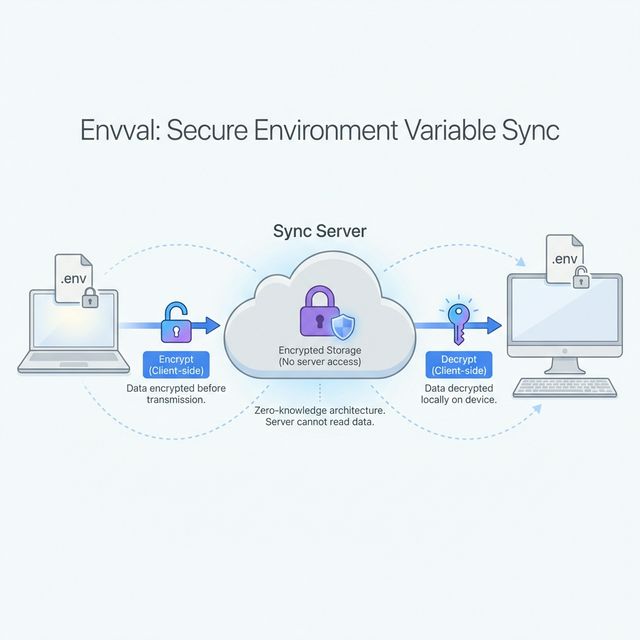
Envval is a secure environment variable management tool. At its core, it keeps your .env files in sync across all your devices, encrypted end-to-end, without you having to think about it.
Edit an env file on your laptop, and it is instantly available on your desktop. Come back to an old project on a new machine, and your variables are already there waiting for you.
The core idea: Your secrets should be as portable as your code, but infinitely more secure.
What it does
I built this for myself first, which means every feature exists because I actually needed it. Here is what Envval can do right now:
Secure Sync is the core of everything. Your env files are encrypted on your device before they leave. They sync through our relay server (Envval), which coordinates the sync but never sees the actual values. End-to-end encrypted, always.
Sneak Peek lets you hover over any environment variable reference in your code and instantly see its value. Right inside VS Code. No more switching back and forth between your code and your .env file.
Command Center is a simple dashboard where you can see all your devices, which projects are synced, and what is up to date versus what is pending. Nothing fancy, just visibility.
Everything runs through a VS Code extension. Install it, log in, and you are good to go. No extra apps, no CLI tools to remember, no context switching.
How it works in practice
The workflow is straightforward. Install the VS Code extension, log in, and point it at your project. Envval detects your .env files automatically. From that moment on, any changes you make are encrypted and synced.
# These values are encrypted before leaving your machine
DATABASE_URL=postgresql://...
STRIPE_SECRET_KEY=sk_live_...
NEXT_PUBLIC_API_URL=https://api.example.com

# Envval syncs all standard .env formats
# .env, .env.local, .env.development, .env.production
The tech behind it
For those who care about what is under the hood: the frontend is built with React 19, TanStack Router, TanStack Query, and Tailwind CSS. Animations use the Motion library.
The backend runs on Hono with Better Auth for authentication, Drizzle ORM for the database, and Upstash Redis for rate limiting. The VS Code extension is written in TypeScript and bundled with esbuild.
The whole thing is a Turborepo monorepo managed with Bun. Nothing exotic, just solid, modern tools that work well together.
What is next
Right now, Envval handles local development really well. But I have bigger plans:
- Staging environments: separate configs for development, staging, and production so you never accidentally use prod keys locally
- Team sharing: securely share environment variables with your team and onboard new developers in minutes instead of hours
- CI/CD integrations: inject secrets directly into your deployment pipelines (GitHub Actions, Vercel, Railway, and more)
These are coming. For now, the focus is on getting the core experience right.
Try it
I built Envval because I was tired of losing hours to a problem that should not exist. If you have ever lost a .env file, accidentally exposed a secret, or spent way too long setting up a development environment, this is for you.
The VS Code extension is in beta. It is free to use, and I would love to hear what you think. Try it out.